> For the complete documentation index, see [llms.txt](https://copilot-docs.bugbase.ai/llms.txt). Markdown versions of documentation pages are available by appending `.md` to page URLs; this page is available as [Markdown](https://copilot-docs.bugbase.ai/enterprise/how-to-trigger-a-web-assessment/configure-scan-settings-for-web-assessment.md).

# Common Web Settings

Settings shared by Web Discovery and Web Assessment, and which settings belong to only one phase.

Most Web settings apply to both phases. This page explains them once. Phase-specific steps are covered in [Web Discovery](/enterprise/how-to-trigger-a-web-assessment/web-discovery.md) and [Web Assessment Phase](/enterprise/how-to-trigger-a-web-assessment/web-assessment-phase.md).

## Which Settings Apply to Which Phase

| Setting                                                 | Wizard step   | Discovery | Assessment |    Discovery + Assessment    |
| ------------------------------------------------------- | ------------- | :-------: | :--------: | :--------------------------: |
| Assets                                                  | Scope         |     ✓     |      ✓     |               ✓              |
| Authentication coverage, starting URL, browser sessions | Scope         |     ✓     |      ✓     |               ✓              |
| Explore manually (Debug Mode)                           | Scope         |     ✓     |      ✓     |               ✓              |
| **Trajectory scope**                                    | Scope         |     –     |      ✓     | – (tests all eligible flows) |
| Egress and location                                     | Scan settings |     ✓     |      ✓     |               ✓              |
| Rate limit, concurrency, auto-calibrate                 | Scan settings |     ✓     |      ✓     |               ✓              |
| **Attack vectors**                                      | Scan settings |     –     |      ✓     |               ✓              |
| Advanced browser toggles                                | Scan settings |     ✓     |      ✓     |               ✓              |
| Max module runtime                                      | Scan settings |     ✓     |      ✓     |               ✓              |
| **Max crawler runs**                                    | Scan settings |     ✓     |      –     |               ✓              |
| **Assessment runtime after discovery**                  | Scan settings |     –     |      –     |               ✓              |
| Custom request headers                                  | Scan settings |     ✓     |      ✓     |               ✓              |
| Run now or schedule                                     | Automation    |     ✓     |      ✓     |               ✓              |

## Scope Settings

### Assets

Select one or more domains or IP addresses. Each row shows its status:

| Badge                           | Meaning                                                                                                                    |
| ------------------------------- | -------------------------------------------------------------------------------------------------------------------------- |
| **Whitelisted**                 | The domain is approved in **Settings -> Domains**. Every domain must be whitelisted before launch.                         |
| **Add to whitelist**            | Select it to add the domain to the whitelist from the wizard.                                                              |
| **Verified** / **Not verified** | Ownership state from **Settings -> Domain Verification**. Verification is required only where your deployment enforces it. |

Use **Manage target assets** to add a root domain that is not listed. Subdomains are discovered automatically; you do not need to add them.

### Configure Selected Asset

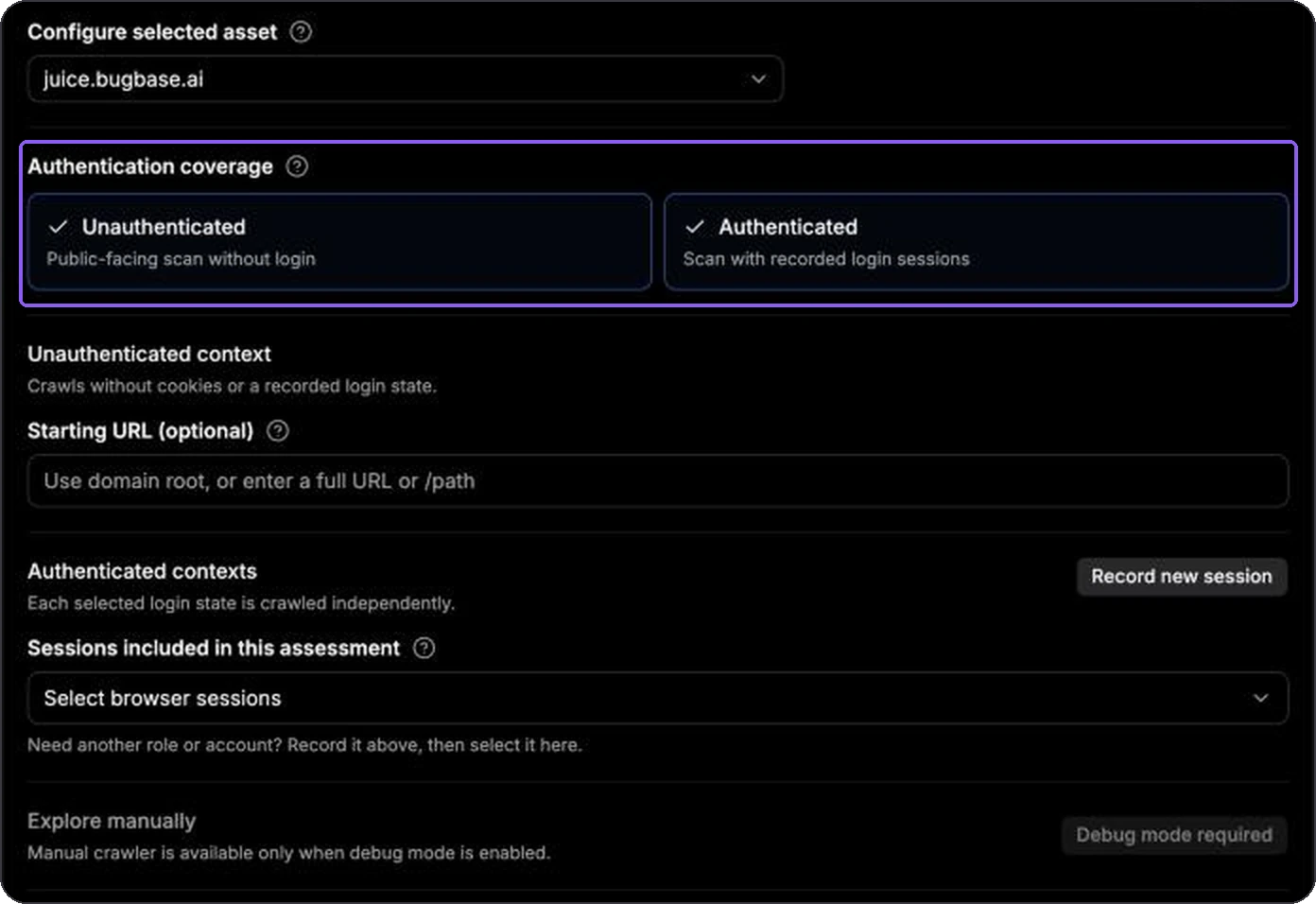
Authentication, starting URLs, browser sessions, and trajectory scope belong to a specific asset. When several assets are selected, pick each one in **Configure selected asset** and set it up separately.

<figure><img src="https://232193438-files.gitbook.io/~/files/v0/b/gitbook-x-prod.appspot.com/o/spaces%2FwolEZzMm5QD9NoFKutSj%2Fuploads%2Fgit-blob-e882f682b9ee433b4ef7e70135110bbbb750cae9%2Fweb-scope-authentication.webp?alt=media" alt="Authentication coverage with both Unauthenticated and Authenticated selected"><figcaption><p>Turn on one or both contexts. Each runs independently.</p></figcaption></figure>

| Setting                                  | What it does                                                                                                                                        |
| ---------------------------------------- | --------------------------------------------------------------------------------------------------------------------------------------------------- |
| **Authentication coverage**              | **Unauthenticated** tests as a logged-out visitor. **Authenticated** tests as each selected browser session. Select both for the broadest coverage. |
| **Starting URL (optional)**              | Sends the logged-out crawler to a full HTTP(S) URL or an absolute path such as `/docs`. Leave empty to start at the domain root.                    |
| **Sessions included in this assessment** | The browser sessions to use. Each session runs separately, which lets Pentest Copilot compare roles. Use **Record new session** to add one.         |
| **Explore manually**                     | Opens the [Manual Crawler](/enterprise/how-to-trigger-a-web-assessment/manual-crawler.md) to capture flows by hand. Available only in Debug Mode.   |

Browser sessions must pass validation before an authenticated run. See [Recording a Browser Session](/enterprise/how-to-trigger-a-web-assessment/recording-browser-session.md) and [Validating Browser Sessions](/enterprise/how-to-trigger-a-web-assessment/validating-browser-sessions.md).

## Scan Settings

### Rate Limit and Egress

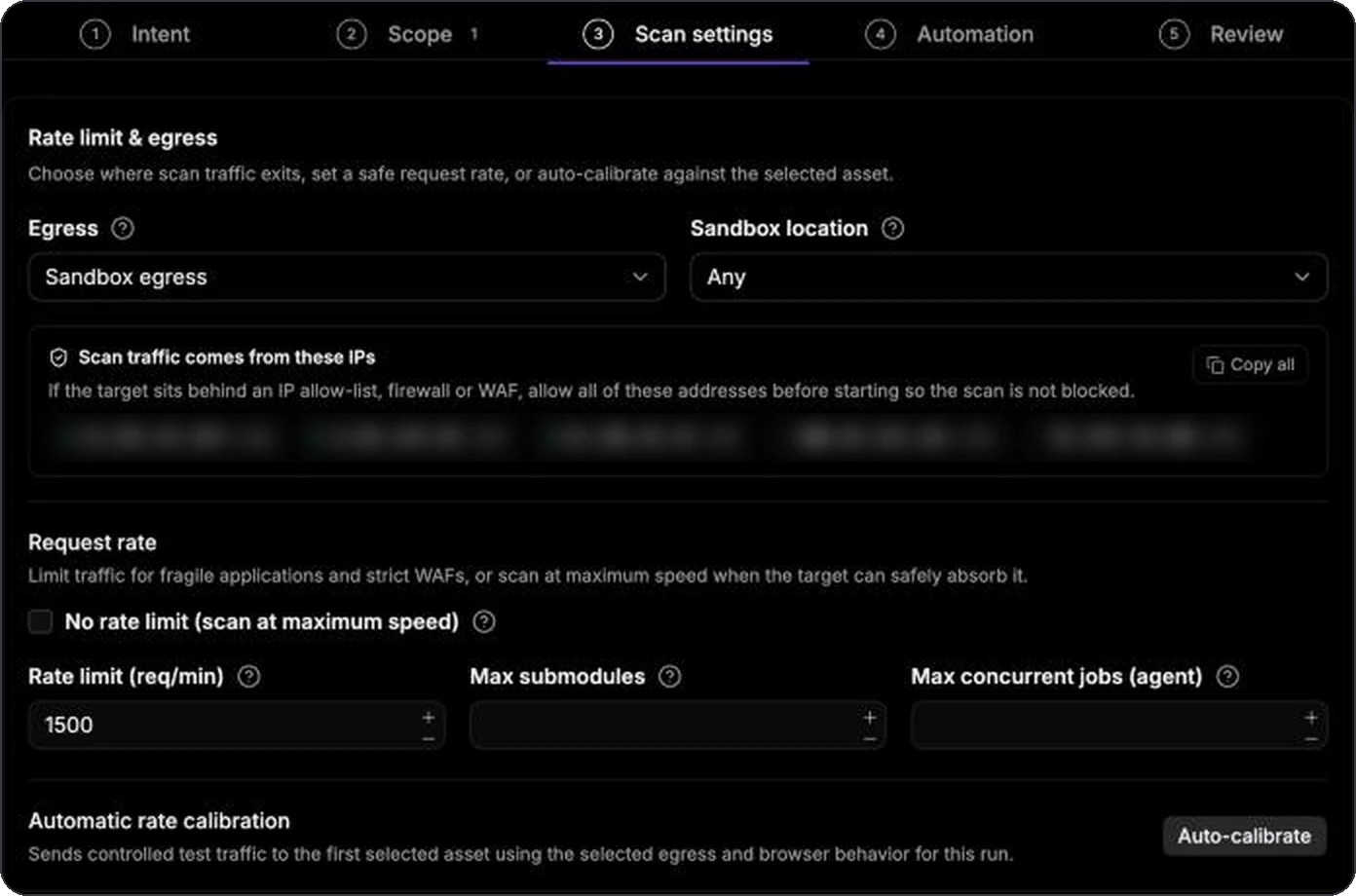
<figure><img src="https://232193438-files.gitbook.io/~/files/v0/b/gitbook-x-prod.appspot.com/o/spaces%2FwolEZzMm5QD9NoFKutSj%2Fuploads%2Fgit-blob-ddecf62d84f9c56dac3004c2fc567b221f717c04%2Fweb-settings-rate-egress.webp?alt=media" alt="Rate limit and egress section with sandbox egress, the scanner IP list (blurred), rate limit 1500, and Auto-calibrate"><figcaption><p>Allow the listed scanner IPs if the target sits behind an IP allow-list or WAF.</p></figcaption></figure>

| Setting                                               | Default                | What it does                                                                                                                                                             |
| ----------------------------------------------------- | ---------------------- | ------------------------------------------------------------------------------------------------------------------------------------------------------------------------ |
| **Egress**                                            | Sandbox egress         | **Sandbox egress** sends traffic from the scanner's public IPs. **Residential proxy** egress makes traffic look like a home connection, which helps with bot protection. |
| **Sandbox location** / **Residential proxy location** | Any / provider default | The country or region the traffic leaves from.                                                                                                                           |
| **Rotate residential proxy IPs**                      | Off                    | Uses a different residential IP over time. Residential egress only.                                                                                                      |
| **Scan traffic comes from these IPs**                 | –                      | The sandbox IPs to allow on the target's firewall or WAF. Use **Copy all**.                                                                                              |
| **No rate limit (scan at maximum speed)**             | Off                    | Removes the request ceiling. Use only when the target owner has approved it.                                                                                             |
| **Rate limit (req/min)**                              | 1500                   | Maximum requests per minute sent to the target. Lower it for production or fragile applications.                                                                         |
| **Max submodules**                                    | Empty                  | Optional cap on how many submodules run at once for the target.                                                                                                          |
| **Max concurrent jobs (agent)**                       | Empty                  | Optional cap on concurrent jobs on the selected agent.                                                                                                                   |
| **Auto-calibrate**                                    | –                      | Sends controlled test traffic to the first selected asset for 2–3 minutes and applies the sustainable rate it measures.                                                  |

Use the same egress for recording, validating, and scanning when the target restricts traffic by IP or country. A target that rejects a different egress can make a healthy browser session look expired.

### Attack Vectors

*Assessment and Discovery + Assessment only.* Selects the vulnerability categories to test. All categories are selected by default. See [Web Assessment Phase](/enterprise/how-to-trigger-a-web-assessment/web-assessment-phase.md#choose-attack-vectors).

### Advanced

Select **Show** under **Advanced** only when the defaults do not suit the target.

<figure><img src="https://232193438-files.gitbook.io/~/files/v0/b/gitbook-x-prod.appspot.com/o/spaces%2FwolEZzMm5QD9NoFKutSj%2Fuploads%2Fgit-blob-a9f4eee9d3fb0824b958d95e9b9f24cf1c5f650e%2Fweb-advanced.webp?alt=media" alt="Advanced settings toggles and Max module runtime"><figcaption><p>Keep the defaults unless you understand the effect on authentication, traffic, and isolation.</p></figcaption></figure>

| Setting                                                 | Default  | What it does                                                                                                                                                 |
| ------------------------------------------------------- | -------- | ------------------------------------------------------------------------------------------------------------------------------------------------------------ |
| **Ignore 404 response checks**                          | Off      | Keeps testing endpoints whose baseline response looks like a not-found page.                                                                                 |
| **Fail module on invalid session**                      | Off      | Stops the run if its browser session stops being valid.                                                                                                      |
| **Skip browser session validation**                     | Off      | Skips the pre-run session check. **Review** asks you to confirm the risk.                                                                                    |
| **Stop browser loops after job completion**             | Off      | Stops background browser loops as soon as their job finishes.                                                                                                |
| **Run browser headful**                                 | On       | Uses a visible browser on the sandbox display, which avoids some headless-browser blocking.                                                                  |
| **Force shared driver**                                 | Off      | Reuses one browser across compatible work. Useful for applications that allow only one active session.                                                       |
| **Disable force navigation on session validation flow** | Off      | Reuses an already-open verification page instead of reloading it.                                                                                            |
| **Max module runtime (seconds)**                        | No limit | Cancels remaining work when the limit is reached. `0` or empty means no limit.                                                                               |
| **Max crawler runs**                                    | No limit | *Discovery only.* Caps crawling for a quicker surface map.                                                                                                   |
| **Assessment runtime after discovery (seconds)**        | No limit | *Discovery + Assessment only.* Caps the automatic Assessment stage.                                                                                          |
| **Custom request headers**                              | None     | Headers added to scan requests, such as a test identifier or a WAF bypass header your team approved. Do not add secrets unless the engagement requires them. |

## Saved Settings per Asset

Pentest Copilot remembers the settings last used for each asset, separately for Discovery and for Assessment. On **Review**, a section you did not change shows **Saved per asset**, which means the run reuses those saved values. Edit the section to replace them. See [Run Assessment Wizard](/enterprise/run-assessment-wizard.md#review).

## Tenant Defaults

**Settings -> Web** holds tenant-wide defaults for **Severity Display**, **Attack Vectors**, and **Custom Headers**. The wizard always sends its own attack-vector selection, so the tenant default mainly affects runs started through the API or MCP without one. See [Settings](/enterprise/settings.md#web).