> For the complete documentation index, see [llms.txt](https://copilot-docs.bugbase.ai/llms.txt). Markdown versions of documentation pages are available by appending `.md` to page URLs; this page is available as [Markdown](https://copilot-docs.bugbase.ai/enterprise/how-to-trigger-a-web-assessment.md).
# Web Assessment
Map and test web applications and APIs in one run with Discovery + Assessment.
Web Assessment tests internet-facing web applications and APIs, logged out and as each user role you provide. Every run has two phases:
| Phase | What it does | Sends attack payloads? | Produces |
| ------------------------------------------------------------------------------------- | -------------------------------------------------------------------------------------------------- | ---------------------- | -------------------------------------- |
| [**Discovery**](/enterprise/how-to-trigger-a-web-assessment/web-discovery.md) | Finds subdomains and services, crawls pages, and records each user flow as a trajectory. | No | Domains, web pages, APIs, trajectories |
| [**Assessment**](/enterprise/how-to-trigger-a-web-assessment/web-assessment-phase.md) | Tests the discovered trajectories with the attack vectors you allow, then validates every finding. | Yes | Validated findings and attack paths |
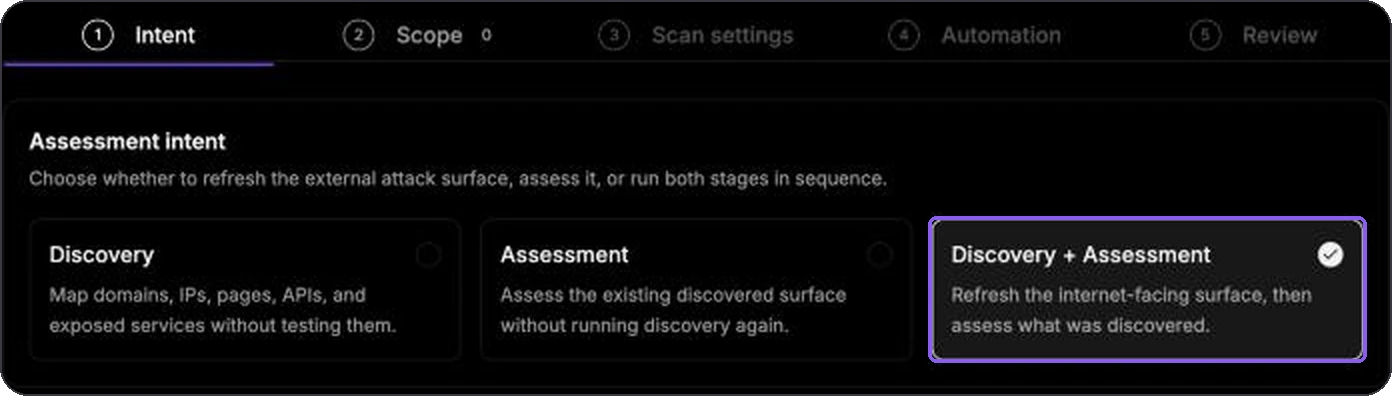
**Discovery + Assessment** runs both phases in one go: Discovery maps the application, and Assessment starts automatically as soon as Discovery finishes. It is the default intent and the recommended way to run a Web assessment.
## Your First Web Run
{% stepper %}
{% step %}
### Add the target
Add the root domain, such as `example.com`, in **Attack Surface -> Target Entities**, and make sure it is whitelisted in **Settings -> Domains**. Verify ownership in **Settings -> Domain Verification** if your deployment requires it. You do not need to add subdomains; Discovery finds them.
{% endstep %}
{% step %}
### Record a browser session (optional)
To test logged-in areas, record one browser session per role, such as admin and regular user, and validate it. See [Recording a Browser Session](/enterprise/how-to-trigger-a-web-assessment/recording-browser-session.md). Skip this step to test only the public surface.
{% endstep %}
{% step %}
### Keep Discovery + Assessment selected
Open **Modules -> Web Assessment -> Run Assessment**. **Discovery + Assessment** is already selected. Select **Continue**.
Discovery + Assessment is the default intent.
{% endstep %}
{% step %}
### Select the asset and logins
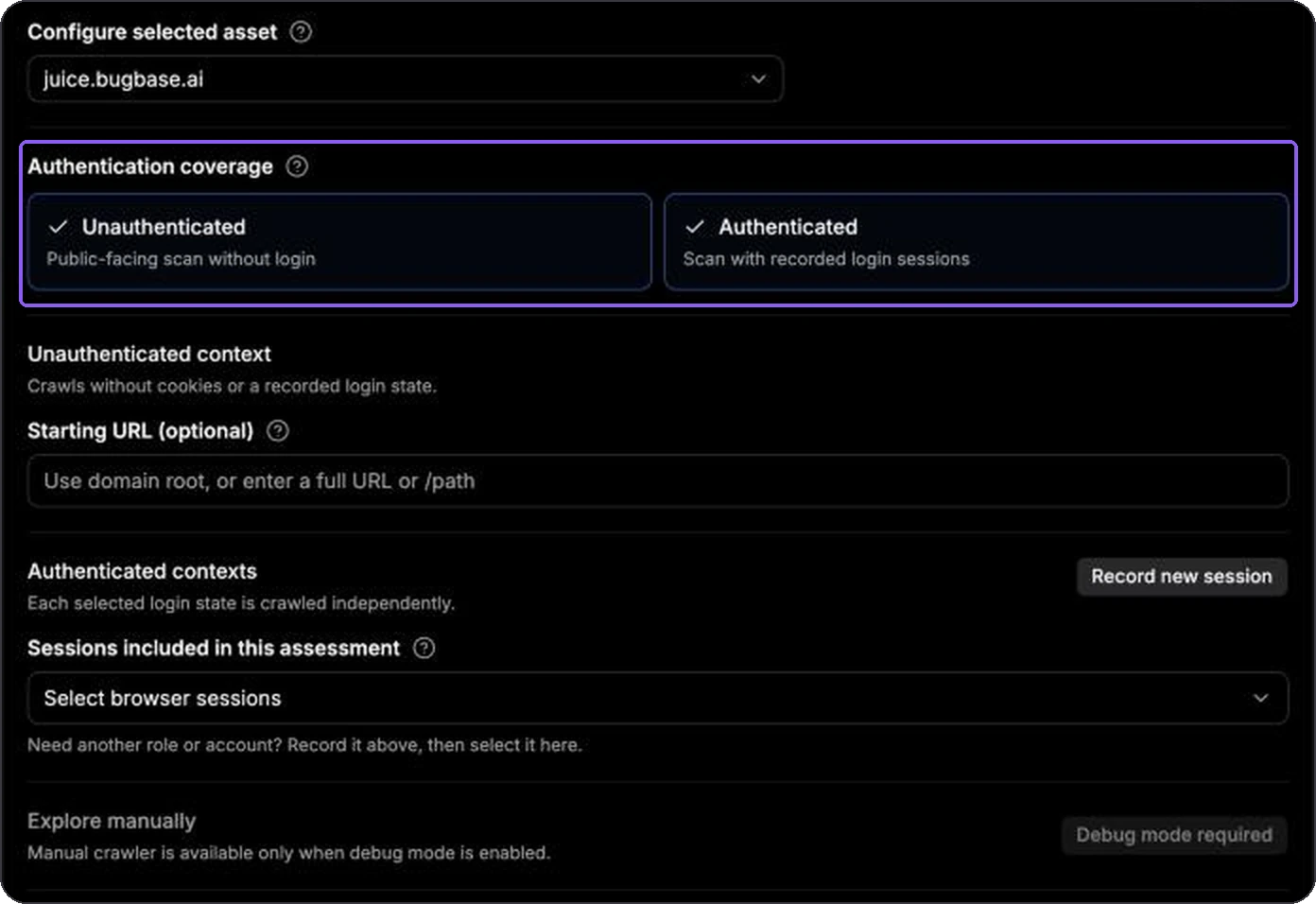
In **Scope**, select the domain. Under **Authentication coverage**, keep **Unauthenticated**, and turn on **Authenticated** with your browser sessions if you recorded any. Each login is crawled and tested separately.
Test logged out, as each role, or both.
{% endstep %}
{% step %}
### Check the traffic settings
In **Scan settings**, the defaults work for most applications: sandbox egress, 1,500 requests per minute, and every attack vector selected. For a production or fragile application, lower **Rate limit (req/min)** or select **Auto-calibrate**. If the target sits behind a WAF or IP allow-list, allow the IPs listed under **Scan traffic comes from these IPs**. See [Common Web Settings](/enterprise/how-to-trigger-a-web-assessment/configure-scan-settings-for-web-assessment.md).
{% endstep %}
{% step %}
### Start the run
Keep **Run now** in **Automation**, check the summary in **Review**, and select **Start run**.
{% endstep %}
{% endstepper %}
## What Happens Next
1. **Activity -> Activity** shows a `WEB_DISCOVERY` row with an **Auto-run** badge for each login context.
2. When Discovery finishes, Pentest Copilot removes duplicate flows and groups related API calls into multi-API flows.
3. A `WEB_ASSESSMENT` row then starts automatically for the same context. It tests every eligible trajectory this Discovery run found on the domain you selected, with the attack vectors you kept selected.
4. Findings appear in **Web Assessment -> Attack Paths** as they are validated.
{% hint style="info" %}
Assessment covers the domain you selected. Subdomains that Discovery finds are added to your inventory and appear in the **Scope** list afterwards; select them in a later run to test them too.
{% endhint %}
Triage the findings with [Analysing Scan Results](/enterprise/analysing-scan-results.md). To understand what each phase did, see [Web Discovery](/enterprise/how-to-trigger-a-web-assessment/web-discovery.md) and [Web Assessment Phase](/enterprise/how-to-trigger-a-web-assessment/web-assessment-phase.md).
## When to Run a Phase on Its Own
Most runs should use **Discovery + Assessment**. Choose a single phase only when you need its extra control:
| Intent | Choose it when |
| -------------------------------------- | ------------------------------------------------------------------------------------------------------------------------------------------------- |
| **Discovery + Assessment** *(default)* | Almost always. One run maps and tests the application. |
| **Discovery** | Active testing is not approved yet, or you want to review what was found before anything is attacked. |
| **Assessment** | Discovery is current and you want to **hand-pick which flows to test** in **Trajectory scope**, or re-test without mapping the application again. |
{% hint style="info" %}
**Discovery + Assessment** tests every eligible trajectory it finds; it has no **Trajectory scope** picker. To keep an API out of every run, such as a third-party payment provider, add a rule in [Settings -> Trajectories](/enterprise/settings/trajectories.md). To leave out flows for one run only, run **Discovery**, then **Assessment** with those flows deselected.
{% endhint %}
## Where Each Setting Lives
| Topic | Page |
| -------------------------------------------------------------------- | ------------------------------------------------------------------------------------------------------------------------------------------------------------------------------------------------------------------------------------------------------------------------------------------------------------------------------------------------------------------------------------------------------ |
| Assets, authentication, egress, rate limits, Advanced | [Common Web Settings](/enterprise/how-to-trigger-a-web-assessment/configure-scan-settings-for-web-assessment.md) |
| What Discovery finds, starting URLs, Max crawler runs, coverage gaps | [Web Discovery](/enterprise/how-to-trigger-a-web-assessment/web-discovery.md) |
| Trajectory scope, attack vectors, validation | [Web Assessment Phase](/enterprise/how-to-trigger-a-web-assessment/web-assessment-phase.md) |
| Intents, scheduling, Review, Saved per asset | [Run Assessment Wizard](/enterprise/run-assessment-wizard.md) |
| Logged-in testing | [Recording](/enterprise/how-to-trigger-a-web-assessment/recording-browser-session.md), [Importing](/enterprise/how-to-trigger-a-web-assessment/importing-browser-session.md), and [Validating](/enterprise/how-to-trigger-a-web-assessment/validating-browser-sessions.md) browser sessions, plus [CAPTCHA and OTP](/enterprise/how-to-trigger-a-web-assessment/handling-captcha-email-mobile-otps.md) |
| Capturing flows by hand | [Manual Crawler](/enterprise/how-to-trigger-a-web-assessment/manual-crawler.md) |
| Keeping APIs out of every run | [Trajectories settings](/enterprise/settings/trajectories.md) |
## Common Blocks
| Problem | Check |
| ----------------------------------------------------------- | -------------------------------------------------------------------------------------------------------------------------------------------------------- |
| "Add {n} selected domain(s) to the whitelist." | Select **Add to whitelist** on the row, or add the domain in **Settings -> Domains**. |
| "Verify domain ownership for {n} selected target(s)." | Complete DNS verification in **Settings -> Domain Verification**. |
| "Select a browser session for {n} authenticated target(s)." | Select a session, or turn off **Authenticated** for that asset. |
| The target blocks scanner traffic | Lower the rate, use **Auto-calibrate**, allow the listed sandbox IPs, or use residential egress. |
| No `WEB_ASSESSMENT` row after Discovery | Assessment starts only if Discovery completed and the domain is still whitelisted and not blacklisted. Check the Discovery row's status in **Activity**. |
| Assessment found few flows to test | Add authenticated coverage, set a **Starting URL**, or record flows with the Manual Crawler, then run again. |
| A schedule uses old settings | Delete it in **Activity -> Schedule** and create a new one. |