> For the complete documentation index, see [llms.txt](https://copilot-docs.bugbase.ai/llms.txt). Markdown versions of documentation pages are available by appending `.md` to page URLs; this page is available as [Markdown](https://copilot-docs.bugbase.ai/enterprise/how-to-trigger-a-network-assessment/network-discovery.md). Agents can also search and read this documentation through its [MCP server](https://copilot-docs.bugbase.ai/~gitbook/mcp).

# Network Discovery

Enumerate hosts, services, directory objects, and cloud inventory from an agent without exploitation.

Network Discovery enumerates what the agent can reach. It finds live hosts, identifies their services, and collects directory and cloud inventory where available. It does not attempt exploitation, so it is the safe first run for any new network.

Everything Discovery finds becomes the inventory that the [Network Assessment Phase](https://copilot-docs.bugbase.ai/enterprise/how-to-trigger-a-network-assessment/network-assessment-phase.md) tests.

## What Discovery Does

| Step                 | What happens                                                                                                                                                                                                                                                                                 |
| -------------------- | -------------------------------------------------------------------------------------------------------------------------------------------------------------------------------------------------------------------------------------------------------------------------------------------- |
| **Live hosts**       | Sweeps the selected subnet, or the partial range inside it, for reachable hosts.                                                                                                                                                                                                             |
| **Services**         | Identifies the open ports, protocols, and products on each live host.                                                                                                                                                                                                                        |
| **Active Directory** | When the agent runs on a Windows host that can query the domain, collects users, groups, computers, ACLs, GPOs, trusts, and certificate services.                                                                                                                                            |
| **Cloud inventory**  | When the agent runs on a cloud VM with an attached identity, collects the provider resources, identities, and policies that identity can read. The result appears as a cloud scope. See [Cloud Assessment](https://copilot-docs.bugbase.ai/enterprise/how-to-trigger-a-cloud-assessment.md). |

Discovery traffic comes from the agent inside your network and can be visible to NDR, EDR, and firewall monitoring. Let your security operations team know before the first run.

## Before You Start

* An agent is installed and connected on a host that can route to the approved subnets. See [Download Agent](https://copilot-docs.bugbase.ai/enterprise/download-agent.md).
* **Attack Surface -> Agents** shows the subnets and interfaces you expect for that agent.
* The subnets you plan to scan are approved for enumeration.

## Run Discovery

{% stepper %}
{% step %}

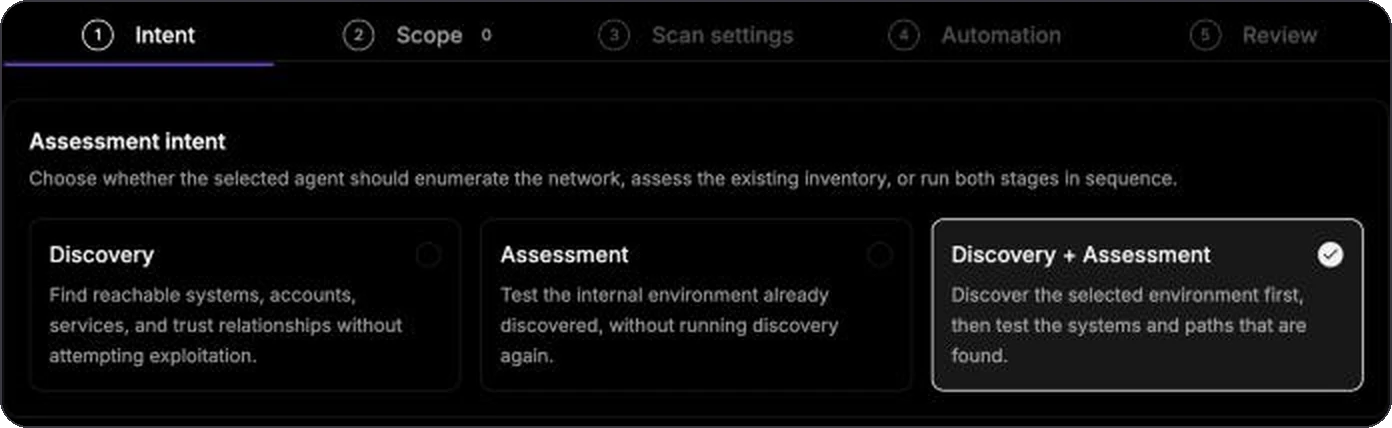
### Choose the Discovery intent

Open **Modules -> Network Assessment -> Run Assessment** and select **Discovery**.

<figure><img src="https://232193438-files.gitbook.io/~/files/v0/b/gitbook-x-prod.appspot.com/o/spaces%2FwolEZzMm5QD9NoFKutSj%2Fuploads%2Fgit-blob-ca1e42626e8010826c04d938cab024fa4bc88a16%2Fnetwork-intent.webp?alt=media" alt="Network intent step with Discovery, Assessment, and Discovery plus Assessment"><figcaption><p>Discovery + Assessment is selected by default. Choose Discovery for enumeration only.</p></figcaption></figure>
{% endstep %}

{% step %}

### Select the agent and subnets

In **Scope**, choose the execution **Agent**. The table lists only the subnets that agent reports as reachable.

Select one or more **Top-level subnet** rows. To narrow the run, enter a **Partial target (optional)** inside the subnet:

* one IP address, such as `10.250.78.25`;
* an IP range, such as `10.250.78.10-10.250.78.60`;
* a CIDR, such as `10.250.78.0/26`.

<figure><img src="https://232193438-files.gitbook.io/~/files/v0/b/gitbook-x-prod.appspot.com/o/spaces%2FwolEZzMm5QD9NoFKutSj%2Fuploads%2Fgit-blob-9c5d04c3e5f68d172803041e0eb8d29603b196ff%2Fnetwork-scope-discovery.webp?alt=media" alt="Agent and subnets step with two subnets selected and a partial IP range entered for one of them"><figcaption><p>A partial target narrows the run. It must stay inside its top-level subnet.</p></figcaption></figure>
{% endstep %}

{% step %}

### Set discovery controls

In **Scan settings**, the **Discovery controls** section has:

| Setting                                          | What it does                                                                                                                                                                                        |
| ------------------------------------------------ | --------------------------------------------------------------------------------------------------------------------------------------------------------------------------------------------------- |
| **AWS resource name prefixes (optional)**        | Limits AWS collection to resources whose names start with these literal prefixes, such as `prod-` or `corp-`. Leave blank for local AD, Azure, or GCP-only environments. Wildcards are not allowed. |
| **Max discovery runtime (seconds)**              | Stops Discovery after this many seconds. Empty or `0` means no limit.                                                                                                                               |
| **Assessment runtime after discovery (seconds)** | *Discovery + Assessment only.* Stops the automatic Assessment stage after this many seconds.                                                                                                        |

<figure><img src="https://232193438-files.gitbook.io/~/files/v0/b/gitbook-x-prod.appspot.com/o/spaces%2FwolEZzMm5QD9NoFKutSj%2Fuploads%2Fgit-blob-1961d4eacad706744eee23a924c1b8b5965ee7e6%2Fnetwork-discovery-controls.webp?alt=media" alt="Discovery controls with AWS resource name prefixes, Max discovery runtime, and Assessment runtime after discovery, followed by the high-impact actions banner"><figcaption><p>With Discovery + Assessment selected, the exploit settings for the Assessment stage appear below the discovery controls.</p></figcaption></figure>

With the **Discovery** intent, no exploit settings are shown. With **Discovery + Assessment**, the exploit families and safeguards from the [Assessment phase](https://copilot-docs.bugbase.ai/enterprise/how-to-trigger-a-network-assessment/network-assessment-phase.md) also appear, because Assessment starts automatically.
{% endstep %}

{% step %}

### Start or schedule the run

Choose **Run now** or **Schedule** in **Automation**, confirm **Review**, and select **Start run** or **Schedule run**. See [Run Assessment Wizard](https://copilot-docs.bugbase.ai/enterprise/run-assessment-wizard.md).
{% endstep %}
{% endstepper %}

## Check What Discovery Found

1. In **Activity -> Activity**, wait for the `NETWORK_DISCOVERY` row to complete.
2. Open **Network Assessment -> Analysis** or **Dashboard -> Exploit Graph** to review hosts, services, users, groups, and cloud resources under the subnet.
3. Start a new run with the **Assessment** intent. The subnet and any cloud scope now appear under **Discovered root**.

## Troubleshooting

| Problem                        | Check                                                                                                                                                                                                                             |
| ------------------------------ | --------------------------------------------------------------------------------------------------------------------------------------------------------------------------------------------------------------------------------- |
| No subnets are listed          | The agent has not reported any. Check its network interfaces and routes in **Attack Surface -> Agents**.                                                                                                                          |
| A subnet is missing            | The agent cannot see it. Install an agent closer to that network, or fix routing.                                                                                                                                                 |
| The partial target is rejected | Keep the IP, range, or CIDR inside the selected top-level subnet.                                                                                                                                                                 |
| No hosts were found            | Check local firewall rules on the agent host and the route to the subnet.                                                                                                                                                         |
| No Active Directory data       | AD collection needs an agent on a Windows host that can query the domain.                                                                                                                                                         |
| No cloud scope was created     | Cloud collection needs an agent on a supported cloud VM with an attached identity. See [Cloud Assessment Prerequisites](https://copilot-docs.bugbase.ai/enterprise/how-to-trigger-a-cloud-assessment/configure-a-cloud-agent.md). |

## Next Step

Continue with the [Network Assessment Phase](https://copilot-docs.bugbase.ai/enterprise/how-to-trigger-a-network-assessment/network-assessment-phase.md) to choose which exploit families may run against the discovered inventory.
